An inquiry needs a path, not an inbox
A person can ask a clear question through a working form and still receive no useful response. The form may succeed technically while the operating path fails. The message lands somewhere, but nobody can say who owns it, what state it is in, or what happens next.
The useful unit is not the form submission. It is the complete path from the person’s action to a responsible first response. That path can remain small, but it must be visible. The seven gaps below are places to inspect, not claims about every business or evidence that automation is required.
1. The page attracts the wrong request
A vague offer creates vague inquiries. When the page does not explain who the work is for, what is included, where the boundary begins, or what the next action does, the visitor must guess. The business then receives requests it cannot answer well and may treat the resulting noise as a form problem.
Repair the promise before the routing. State the useful result, relevant audience, material exclusions, pricing status, and next step with enough precision that a reasonable person can choose correctly.
2. The form collects an address but not the situation
A name and email can create a contact record without creating enough context for a useful response. At the other extreme, a long qualification form can demand information the business has not earned or does not need.
Collect the minimum facts required to understand and route the request. A short description of the current problem and desired finish often matters more than a large set of generic fields. Explain what not to submit, especially passwords, payment details, health information, or other secrets.
3. The successful submission has no durable record
An on-screen success state proves only what it accurately says. If the request is sent to one inbox without a stable record or reference, it can become difficult to distinguish a missed request from a delivery failure, duplicate, or spam decision.
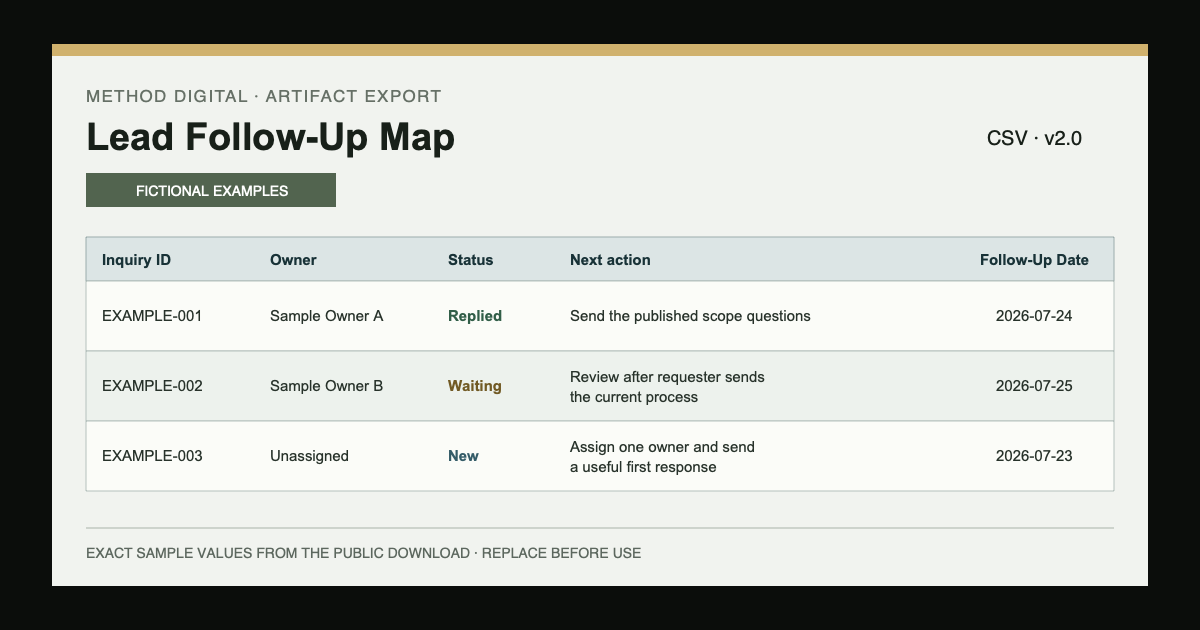
Use one appropriate destination and retain only the information the workflow needs. A small spreadsheet or CRM record can be enough when it shows the source, summary, owner, status, next action, and review date. The record should not become a reason to keep unnecessary personal information.
4. An alert reaches several people but assigns nobody
Notifications create awareness. They do not create ownership. A message sent to a shared channel, inbox, or group can make everyone aware while leaving each person to assume someone else will respond.
Assign one owner to every open inquiry. The owner can reassign it when necessary, but the record should never depend on collective memory. If the operation has one founder, name that responsibility plainly rather than pretending a team queue exists.
5. The acknowledgement makes an unsupported promise
An automatic acknowledgement can reduce uncertainty, but it can also create a commitment the operation cannot keep. “We will respond within an hour” is not helpful when no verified capacity or coverage supports it. Silence is not the only failure; a false expectation is also a failure.
Confirm receipt only when receipt is real. Explain what happens next and separate a recorded request from an accepted engagement. Keep changing prices, start dates, scope decisions, and unusual requests behind human review.
6. The record has a status but no next action
Labels such as new, contacted, or waiting can describe the past without deciding the future. A useful open record needs one specific next action and the date when it will be taken or reviewed.
Write “send the published scope questions on Thursday,” not “follow up.” If another person must reply first, write when the owner will review the waiting state. A note without a decision is not a follow-up system.
7. Failures remain invisible
Forms, integrations, email providers, spreadsheets, and CRMs can all fail or change. A workflow that assumes every step worked has no way to distinguish quiet success from quiet loss.
Make the important failure visible to a person. Test an ordinary case, an incomplete case, and one expected exception. Keep a manual route for consequential work and document who can check the source when an alert, acknowledgement, or record does not appear.
Repair the smallest complete path
Do not begin by buying a larger system. Choose one real inquiry source and one destination. Name the owner, use a small set of explained statuses, require a visible next action, and define when the open list is reviewed.
Only add automation after the manual path is understandable. Alerts, acknowledgements, routing, and reminders can reduce repeated labor, but a person still owns permission, accuracy, promises, exceptions, and the final response.
Limitations and disclosure
This article is an editorial explanation of MethodCo’s published Lead Follow-Up Map, setup guide, Service scope, and responsible-automation boundary. The fictional example rows in the related artifact are demonstrations, not customers, results, or proof of demand.
This material does not replace legal, privacy, security, accessibility, deliverability, or professional advice. Consent, retention, outreach, regulated records, and access requirements depend on the real context. No response rate, sale, revenue result, or delivery outcome is promised.
Next action: trace one inquiry
Use the downloadable checklist with one safe internal test. Start at the page, complete the form, inspect the destination, identify the owner, read the acknowledgement, write the next action, and confirm how a failure would become visible.
Mark an item complete only when you can point to evidence. If the path breaks, repair that one handoff before adding more fields, messages, integrations, or channels.