A website transfers responsibility
A brochure can stop after explaining what something is. A working website cannot. The moment a visitor decides to ask a question, request help, download a file, or take another meaningful step, responsibility moves from the page into an operating process.
That transfer is the handoff. It includes the promise made on the page, the action the visitor takes, the information the business receives, the person who owns the response, and the evidence that the request did not disappear. A polished page with a weak handoff creates a specific kind of disappointment: the visitor understood enough to act, but the business was not ready to receive the action.
Reviewing a website as a handoff changes the question. Instead of asking only whether the layout looks credible, ask whether a reasonable visitor can understand the offer, choose the right next step, complete it without avoidable friction, and know what happens afterward.
1. Make the promise match the next action
The main promise and the main action should describe the same exchange. If a page promises a scoped review, the action should lead to that review’s requirements or request path. If a resource is free, the action should open or download the real resource. “Learn more” is rarely enough when the visitor needs to know whether they are reading, downloading, requesting, or paying.
Check every important page for one primary action. Secondary paths can exist, but they should not compete with the decision the page is meant to support. A visitor should not have to infer whether a button starts a purchase, submits information, opens an email, or simply moves to another explanation.
2. Ask only for information the handoff can use
A form is not useful because it has many fields. It is useful when each requested field helps the next responsible person understand, route, or answer the request. Name and reply information may be necessary. A short description of the situation may be necessary. A broad set of company, budget, demographic, or access questions may not be.
For each field, name the decision it supports and the person who will use it. Remove fields collected only because a template included them. Do not ask for passwords, payment-card details, sensitive records, or broad system access through an ordinary inquiry form. Private information should enter only through a reviewed process with a legitimate purpose.
3. Treat submission as the beginning, not the finish
A success message should say what actually happened. If the site recorded the request, say that it was received and provide a reference when the system supports one. If the action merely opens an email draft, say that nothing is sent until the visitor reviews and sends it. A message that implies submission when no record exists breaks trust at the exact moment trust matters most.
The visitor also needs a believable next expectation. That may be a confirmation email, a manual review, a download beginning, or a clear statement that availability and scope will be checked before work is accepted. Do not publish a response time, start date, or acceptance promise that the real operation cannot support.
4. Name one owner for the first response
Every meaningful inquiry needs one visible owner, even when several people may later contribute. Shared inboxes and automated alerts can help, but neither is ownership. The owner is the person responsible for reviewing the request, choosing its next honest state, and making sure a promised response is not silently missed.
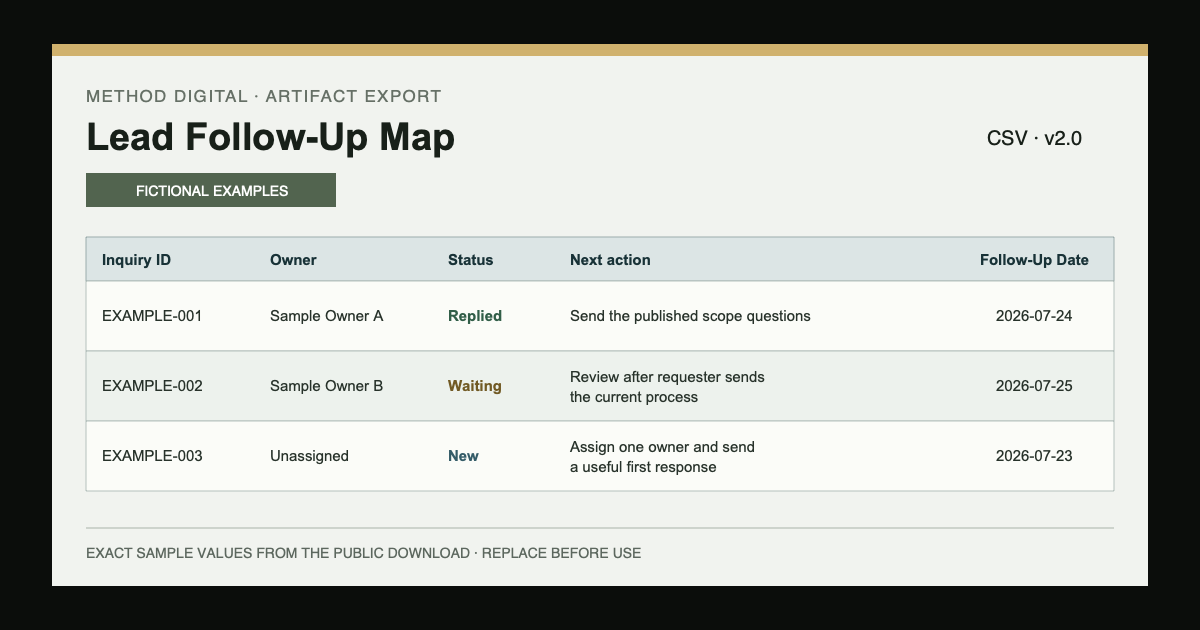
A small operation can keep this simple: record the source, request summary, owner, status, next action, and review date in one place. The tool can be a spreadsheet, CRM, or another approved system. The important part is that the record remains understandable without relying on memory or searching several inboxes.
5. Review the path on desktop and mobile
The handoff should work where the visitor actually encounters it. On a phone, check whether the main action is visible, form fields are labelled, error messages are readable, the keyboard does not cover the next step, and the confirmation state appears near the action. On desktop, check whether wide layouts leave the primary action isolated or push important scope into a distant column.
Keyboard access, visible focus, readable contrast, sensible headings, and labelled controls are part of the handoff rather than a separate decoration. Performance matters for the same reason: if the page shifts, stalls, or hides the form while loading, the transfer of responsibility becomes less dependable.
6. Test the first response with safe evidence
Use a clearly labelled internal test. Submit an ordinary request, an incomplete request, and a request that should not fit the published scope. Confirm where each record appears, who is alerted, what the visitor sees, what acknowledgement is sent, and how an exception reaches a person.
Do not treat a successful automation run as complete proof. Check the actual record, wording, dates, recipient, and next action. Then disable or remove the test data according to the system’s real retention rules. A workflow is ready only when a person can explain what happened and recover when it does not happen.
Put it into practice
Choose one important page and follow one path from arrival to first response. Do not audit the whole website at once. Record what the visitor is promised, the action they can take, the information collected, the confirmation shown, the owner, and the next review point.
Use the downloadable handoff review to mark a fact, not a preference, at each stage. If the next action or owner cannot be named, repair that boundary before adding another tool or redesigning the page.
- Open the page on a phone and a desktop.
- Complete the action using non-sensitive test information.
- Read every message as if you did not know the internal process.
- Confirm the request reaches one named owner.
- Write the next action and the evidence that proves it happened.
Boundaries and disclosure
This article is a general operating review based on MethodCo’s published website-audit scope, service-request boundary, Lead Follow-Up Map, and responsible-automation standard. It is not a client case study, accessibility certification, performance audit, legal or privacy advice, or a guarantee that a particular website will produce more inquiries.
Different organizations have different contractual, accessibility, retention, security, and regulatory responsibilities. Use appropriate professional review where the situation requires it. The practical standard here is narrower: make the promise, action, transfer, owner, and next response truthful and visible.